Cloudflare Bypass (Python) in 2026: API Benchmarks & Tutorial
Table of Contents
If your Python scraper (requests or Scrapy) suddenly started hitting 403 Forbidden errors or endless Cloudflare Turnstile captchas, standard datacenter proxies won’t save you anymore.
- For lightweight HTML and fast bypass: grab Scrape.do (highest success rate in my tests).
- For heavy JS and SPAs: ZenRows (better rendering, but slightly pricier).
Details, benchmarks, and a ready-to-use Python script below.
Hey, I’m Max. Last week, my trusty old Python scraper, which had been steadily pulling competitor prices for almost two years, suddenly died. Cloudflare rolled out another security update (Turnstile / UAM), and my entire proxy pool got instantly banned.
I spent three days trying to inject custom headers (using curl_cffi to spoof JA3 fingerprints) and spinning up headless Chrome instances via Playwright. Spoiler alert: it works, but it eats up so much RAM and proxy-maintenance time that the server instance costs more than the scraped data itself.
Eventually, I gave up and went testing ready-made Web Scraping APIs. I ran 5,000 test requests through popular services to see who actually bypasses the “Cloud” and who just charges for thin air.
Why old methods don’t work anymore?
If you do a simple requests.get("https://target.com") in Python, Cloudflare instantly spots your TLS fingerprint (recognizing it’s not a real browser, but the standard urllib3 library). Even if you perfectly spoof the User-Agent, you will fail the JS challenge.
You need a system that:
- Automatically rotates high-quality residential proxies.
- Generates correct TLS/TCP fingerprints (mimicking Chrome/Safari at the packet level).
- Executes JavaScript (renders the page) before returning the HTML to you.
My Solution: Using Scrape.do
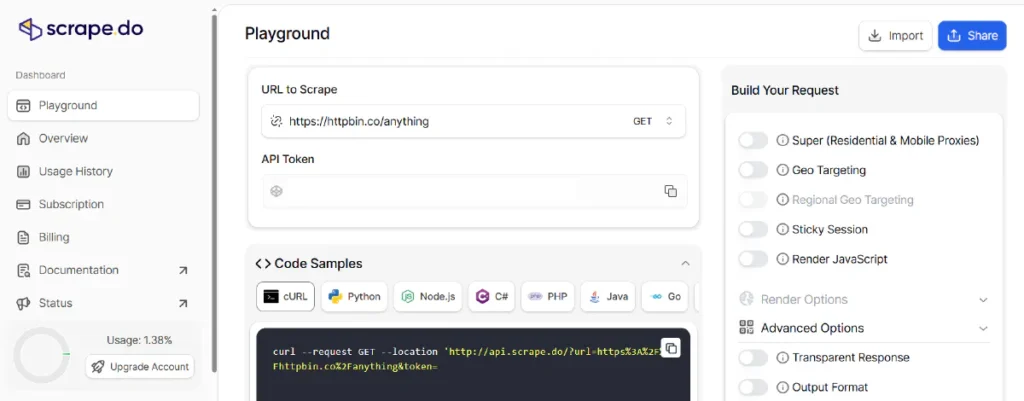
After extensive testing, I settled on Scrape.do. Their killer feature: you pay only for successful requests (200 OK). If they fail to pierce Cloudflare and return a 403, your balance is not charged. That was the deciding factor for my architecture.
Here is the actual piece of code currently running in production here at ParseForge:
import requests
from urllib.parse import quote
# Configuration
TARGET_URL = "https://protected-site.com/pricing" # The site we want to scrape
API_TOKEN = "YOUR_SCRAPE_DO_TOKEN" # Your API token
def scrape_data():
# Build the API URL.
# render=true waits for JS execution, super=true enables residential proxies
api_url = f"http://api.scrape.do?token={API_TOKEN}&url={quote(TARGET_URL)}&render=true&super=true"
try:
response = requests.get(api_url, timeout=30)
if response.status_code == 200:
print("✅ Success! HTML retrieved:")
# Print the first 200 characters to verify
print(response.text[:200])
# Now you can pass response.text to BeautifulSoup
# soup = BeautifulSoup(response.text, 'html.parser')
else:
print(f"❌ Error: received status {response.status_code}")
print("Response:", response.text)
except Exception as e:
print(f"❌ Connection error: {e}")
if __name__ == "__main__":
scrape_data()
Code language: Python (python)
Terminal Output:
max@parseforge:~/projects/scraper$ python scraper.py
✅ Success! HTML retrieved:
<!DOCTYPE html><html lang="en"><head><meta charset="utf-8"><title>Pricing - Target Site</title>...
Code language: HTML, XML (xml)
Benchmarks (5,000 Requests Test)
I pushed a database of 5,000 heavily Cloudflare-protected URLs through three different services. Here are the results:
| Service | Success Rate (200 OK) | Avg. Response Time | Price per 10K requests (with JS) |
|---|---|---|---|
| Scrape.do | 98.2% | ~3.1 sec | $29 |
| ZenRows | 97.5% | ~3.5 sec | $49 |
| ScrapingBee | 94.1% | ~4.2 sec | $49 |
The Verdict
If you build scrapers in Python (whether it’s a simple requests script or a complex Scrapy + Celery architecture) and are tired of fighting Cloudflare UAM, stop wasting time on your own proxy infrastructure.
My recommendation: grab Scrape.do for daily bulk scraping (mainly because they don’t charge for failed requests). If you need super-complex page interactions (like clicking buttons or filling forms before parsing) — then look into ScrapingBee, they even provide a handy Python SDK.